2. Start a new document
2.1 Open the editor
- Go to https://homebrewery.naturalcrit.com.
- Sign in with Google if you want the brew saved to your account (strongly recommended).
- Start a new brew (Home / New, or https://homebrewery.naturalcrit.com/new).
- Keep the V3 renderer for new work. Legacy still opens old documents; new snippets and styling live on V3.
2.2 Learn the workspace
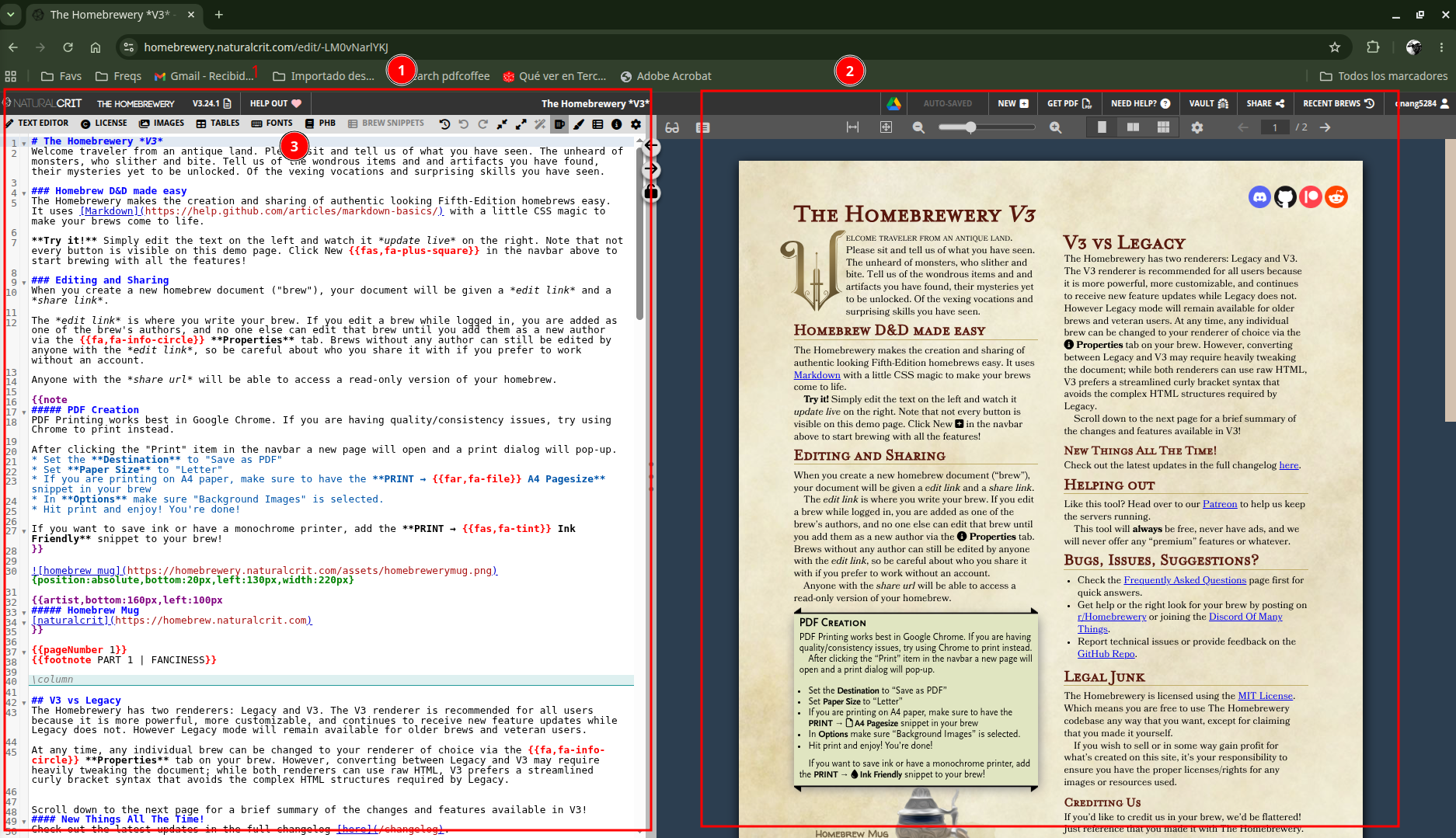
| Area | What it does |
|---|---|
| Brew editor (1) | Your Markdown source |
| Preview (2) | Paginated pages as they will print |
| Snippet bar (3) | Inserts PHB blocks, tables, images, page numbers |
Gentle advice: save early, give the brew a real title, and write one short paragraph first. Confirm the preview updates before you add stat blocks. That single check saves a lot of “did I type in the wrong place?” confusion.
2.3 Use snippets instead of memorizing syntax
Place the cursor where the content should appear, then pick a snippet (for example PHB → Monster Stat Block or Tables → …). Homebrewery pastes a complete, valid example. Replace the placeholder names and numbers. You can always trim extra rows later.