5. Player's Handbook snippets
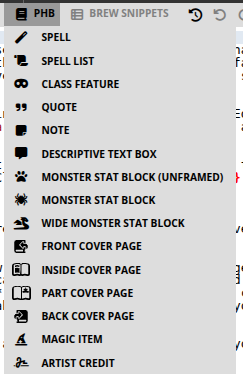
PHB stands for Player's Handbook: the core fifth-edition Dungeons & Dragons player rulebook (the book with classes, spells, and equipment). Homebrewery’s PHB menu copies that look—parchment notes, spell write-ups, class features, monster frames, and cover pages—so a homebrew module can sit next to the official book without a layout app.
These snippets live under the book icon on the snippet bar (PHB), not under Text Editor. Text Editor still decides pages and columns; PHB decides the game blocks on those pages. Place the cursor, insert the snippet, then replace the joke placeholder names with your own. Leave the {{ }} wrappers and :: definition lists; those are the visual structure.
Official D&D names and art are still Wizards of the Coast’s. You are responsible for what you publish.
5.1 Spell
Menu: PHB → Spell
Inserts a single spell write-up: name as ####, italic school line, then Casting Time, Range, Components, and Duration as definition-list rows (:: between label and value). Body paragraphs follow. That hanging-indent pattern is the same one the PHB uses.
#### Tide Lantern
*2nd-level evocation*

**Casting Time:** :: 1 action
**Range:** :: Touch
**Components:** :: V, S, M (a pinch of dry salt)
**Duration:** :: Concentration, up to 1 hour

A flame, equivalent in brightness to a torch, springs from an object that you touch.
The effect looks like a regular flame, but it creates no heat and doesn't use oxygen.
There is no {{spell}} wrapper. The heading level and :: rows are enough for the theme. Keep the school line italic. Put spells in a column, or wrap several in {{wide}} only if you are laying out a full-page appendix.
5.2 Spell List
Menu: PHB → Spell List
Inserts: {{spellList,wide ... }}
A two-column, full-width list grouped by level (##### Cantrips (0 Level) through ##### 9th Level) with bullet spell names. Use it on a class or subclass page under “Spell List.”
{{spellList,wide
##### Cantrips (0 Level)
- Light
- Prestidigitation

##### 1st Level
- Fog Cloud
- Shield
}}
Delete levels the class does not get. Drop ,wide (or wrap a narrower list) if you want the list in one column beside flavor text. The snippet fills itself with random joke names; replace every bullet.
5.3 Class Feature
Menu: PHB → Class Feature
Inserts the opening spread of a class chapter: “As a [class], you gain the following class features,” then Hit Points, Proficiencies, optional Spellcasting Ability, and Equipment. Definition lists again use ::. Place this after your class table (the table itself is a Tables snippet, in a later chapter).
## Class Features

As a tidewarden, you gain the following class features.

#### Hit Points
**Hit Dice:** :: 1d10 per tidewarden level
**Hit Points at 1st Level:** :: 10 + your Constitution modifier
**Hit Points at Higher Levels:** :: 1d10 (or 6) + your Constitution modifier per tidewarden level after 1st

#### Proficiencies
**Armor:** :: Light armor, medium armor, shields
**Weapons:** :: Simple weapons, martial weapons
**Tools:** :: Navigator's tools

**Saving Throws:** :: Strength, Wisdom
**Skills:** :: Choose two from Athletics, Perception, Survival, Insight
The snippet’s sample class names are jokes (archivist, fancyman). Rename everything before you share. After this block, add each numbered feature as a ### heading and body text in the same chapter.
5.4 Quote
Menu: PHB → Quote
Inserts: {{quote ... }} with nested {{attribution ... }}
A pull-quote in the PHB italic style, with author and work on the attribution line. Use it to open a chapter or break a long column of rules.
{{quote
The sword glinted in the dim light, its edges keen and deadly.

{{attribution Eolande Blackwood, *The Blade of Destiny*}}
}}
Keep quotes short. Long quotations belong in a Descriptive Text Box if the GM should read them aloud.
5.5 Note
Menu: PHB → Note
Inserts: {{note ... }}
The yellow (parchment) sidebar the PHB uses for asides, optional rules, and “this is interesting but not the main procedure.” Tables and lists work inside a note.
{{note
##### Time to Drop Knowledge
Harbor Watch will ignore a bribe under 5 gp. They will not ignore a talking gull.
}}
5.6 Descriptive Text Box
Menu: PHB → Descriptive Text Box
Inserts: {{descriptive ... }}
The green-gray read-aloud box. Use it for boxed text the DM recites when the party enters a room. Same inner Markdown as a note (headings, lists, tables); different job and color.
{{descriptive
##### The Counting House
Salt and ink hang in the air. Two clerks freeze with quills raised. Behind them, a mastiff opens one eye.
}}
Do not put mechanical DCs inside a descriptive box unless the table wants to hear them. Mechanics belong in a Note or in the body.
5.7 Monster Stat Block (unframed)
Menu: PHB → Monster Stat Block (unframed)
Inserts: {{monster ... }} with no frame class
Same stat layout as the framed block (name, type line, AC/HP/Speed, ability grid, traits, actions) without the heavy parchment border. Use it for an NPC in a town chapter, a simple beast in a sidebar, or when your own background art would clash with the frame.
Keep the ___ rules and :: rows. You are only dropping the picture-frame chrome.
5.8 Monster Stat Block
Menu: PHB → Monster Stat Block
Inserts: {{monster,frame ... }}
The default MM/PHB look: single column, textured frame, gold rules. Use it when the creature fits in one column (most ordinary stat blocks).
{{monster,frame
## Pier Shade
*Medium undead, neutral evil*
___
**Armor Class** :: 13
**Hit Points** :: 22 (5d8)
**Speed** :: 30 ft., swim 30 ft.
___
|STR|DEX|CON|INT|WIS|CHA|
|:---:|:---:|:---:|:---:|:---:|:---:|
|6 (−2)|16 (+3)|10 (+0)|8 (−1)|12 (+1)|14 (+2)|
___
**Senses** :: darkvision 60 ft., passive Perception 11
**Languages** :: the languages it knew in life
**Challenge** :: 1 (200 XP) {{bonus **Proficiency Bonus** +2}}
___
***Sunlight Weakness.*** While in sunlight, the shade has disadvantage on attack rolls, ability checks, and saving throws.

### Actions
***Chilling Touch.*** *Melee Spell Attack:* +4 to hit, reach 5 ft., one target. *Hit:* 9 (2d6 + 2) necrotic damage.
}}
Replace sample numbers; leave ::, ___, and the ability table. Trait names use ***Name.*** The {{bonus ...}} chip on the Challenge line is part of the current snippet.
If the block is too tall: shorten flavor, move it higher in the column, or switch to the wide variant. Splitting with ___ mid-block is a last resort and a fixed break.
5.9 Wide Monster Stat Block
Menu: PHB → Wide Monster Stat Block
Inserts: {{monster,frame,wide ... }}
The same framed block spanning both columns, like a large MM entry. Use it for legendary or lair-action creatures, or a full-width “poster” under a chapter heading.
wide restarts column flow after the block. Put story text after the closing }}, then add \column if you need to rebalance.
5.10 Front Cover Page
Menu: PHB → Front Cover Page
Inserts: {{frontCover}} plus logo, title, subtitle, {{banner HOMEBREW}}, footnote, cover art, and a trailing \page
This is a full physical first sheet. Replace the title, subtitle, banner word, flavor footnote, and image URL. The snippet already ends with \page, so the next thing you type is page 2.
Pair it with Skip Page Number from Text Editor so the cover is not printed as folio 1. Cover snippets also flip left/right footer sides for the pages that follow.
{{frontCover}}
{{skipCounting}}
{{logo }}
# Saltmarsh Gazetteer
## A Dockside Heist
___
{{banner HOMEBREW}}
You are responsible for cover-art licenses. The sample images are Homebrewery assets for testing.
5.11 Inside Cover Page
Menu: PHB → Inside Cover Page
Inserts: {{insideCover}} with title, a center watercolor mask around art, logo, and \page
Use the sheet immediately behind the front cover: credits, “a book by,” or a second title treatment. Skip numbering here too if you do not want it in the published count.
5.12 Part Cover Page
Menu: PHB → Part Cover Page
Inserts: {{partCover}} with # PART X, a subtitle, an edge-masked image, and \page
Drop this at the start of Part 2, Part 3, and so on in a long adventure. Change PART X and the subtitle. These sheets often skip the folio as well, then Restart Numbering only if you want each part to begin at page 1 (most modules keep one run of numbers).
5.13 Back Cover Page
Menu: PHB → Back Cover Page
Inserts: {{backCover}} with a short blurb, a rule, a “for use with any fantasy roleplaying ruleset” line, art, and a white Homebrewery logo
This is the last physical page. Put your elevator pitch in the blurb paragraphs (: between them is vertical space). Add Homebrewery Credit from Text Editor if you want that badge as well as the logo already on this snippet.
5.14 Magic Item
Menu: PHB → Magic Item
A DMG-style item: #### name, italic type/rarity/attunement line, then body text. Like Spell, there is no special wrapper—the heading and italics carry the style.
#### Tide Lantern
*Wondrous item, uncommon (requires attunement)*
:
This brass lantern burns with cold salt-fire. While lit, it sheds bright light in a 20-foot radius in fog that would otherwise heavily obscure the area.
The lone : under the rarity line is a small gap before the description. Change rarity and attunement to match your table.
5.15 Artist Credit
Menu: PHB → Artist Credit
Inserts: {{artist,top:90px,right:30px ... }}
A small caption block you pin on the page (cover art, a map, a full-page illustration). Set top / right / left / bottom so it sits on a quiet corner of the image. Include the work title and a link to the artist.
{{artist,top:90px,right:30px
##### Bird with autumn foliage
[by L. Prang & Co.](https://www.loc.gov/resource/pga.14148)
}}
Add one credit per sourced image. This does not replace a license page; it is the on-page caption.